Snapchat Spotlight: Complete 2025 Guide to Features, Meaning & Tips
Snapchat Spotlight is a feature inside the Snapchat app that shows short vertical videos made by users. It works like TikTok or Instagram Reels, but it focuses on fun and creative Snaps that can quickly go viral. The best part is that anyone can join and share their content, even without a big follower base. Alongside features like Snapchat Planets, which rank your best friends in a fun solar system theme, Spotlight adds another layer of creativity and engagement to the app.
The content available to a user on Snapchat Spotlight is different from that of any other user. The Snapchat algorithm monitors user interactions, like what they watch, like as well and share, and then makes similar suggestions. This is designed to ensure that each user has a different and interesting feed that provides entertainment according to their preferences.
For creators, Snapchat Spotlight provides more than just visibility. It has also given its creators a monetization feature that allows them to earn real cash for creative videos Snap has deemed as top-performing. This makes Snap more than just a good time for users who enjoy showing their creative sides.
Key Takeaways – What You’ll Learn About Snapchat Spotlight 2025
- Snapchat Spotlight is Snapchat’s version of TikTok/Reels — a short-form video feed where anyone can go viral, even without followers.
- Unlike Stories (for friends) or Snap Map (location-based), Spotlight is built for viral entertainment and gives every creator a chance to reach a wider audience.
- You can upload videos up to 60 seconds, add music, snapchat filters, or text, and even post anonymously if you’re 18+.
- Spotlight content is public by default, meaning your Snaps can be seen globally if the algorithm selects them.
- Snapchat personalizes your Spotlight feed using an algorithm that tracks what you watch, like, and share.
- Creators can earn money through ad-revenue sharing on longer Spotlight videos — estimated payouts range from about $1–$5 per 1,000 views.
- To boost Spotlight views, focus on trends, post consistently, use music and captions, and keep content original and authentic.
- Your own Spotlights can be saved to Memories or Camera Roll, while other creators’ videos can only be Favorited or shared, not downloaded.
- Common issues like “no views” often happen if videos don’t meet guidelines or haven’t been pushed by the algorithm yet.
- The Spotlight tab can’t be fully removed, but you can mute notifications or hide it from navigation in the 2025 app update.
What is Snapchat Spotlight?
Snapchat Spotlight is the app’s short-form video feature where users can discover trending, entertaining Snaps made by the community. Similar to TikTok, it focuses on viral content, letting anyone create and share videos up to 60 seconds long.
Snapchat Spotlight Pro Tips for 2025
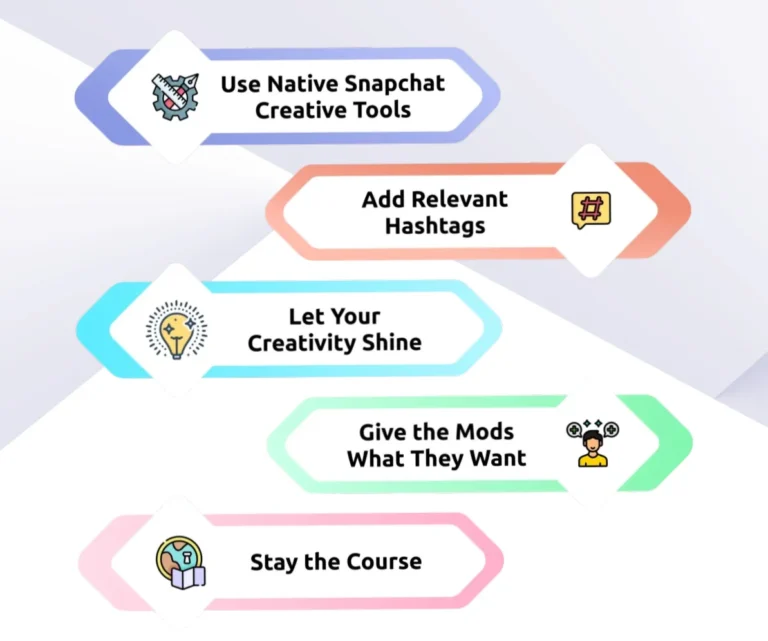
Below infographic highlights the best tips to boost visibility, gain more views, and make the most of Snapchat Spotlight.
Key Differences Between Spotlight, Stories, and Snap Map
- Spotlight is designed for viral entertainment. These users can have a wider audience access their content because they can record videos for a maximum duration of 60 seconds. With Spotlight, users do not have to be limited to their friends, and unlike Stories, users have an opportunity to make money via Snap Crystals with high-performing Snaps.
- Stories work differently. Stories allow the user to share their Snaps and videos that are 10 seconds or less to be viewed for a day, and can be kept for an entire year. Stories are designed for only close friends and followers, which makes users feel a bit more secure.
- Snap Map focuses on location. It lets people share Snaps linked to specific places and also shows where friends are, if they choose to share their location. Public Snaps placed on the Map are available for a long time and allow users to view events and activities occurring worldwide.
What Does “Spotlight” Mean on Snapchat?
On Snapchat, Spotlight refers to the special video feed that highlights the most engaging Snaps. Unlike Stories that are limited to friends or followers, Spotlight gives every user a chance to reach a much wider audience. The main idea is to showcase creative and entertaining content, no matter how many followers the creator has.
If you sometimes see a Snap that is labeled “Added by Spotlight,” it means that the Snap’s algorithm chose that specific video for the Spotlight feed. It is safe to say that such Snaps are engaging enough for the wider Snap community and not just limited to the creator’s friends.
How to Use Snapchat Spotlight?
Using Snapchat Spotlight is pretty straightforward. You can post videos, watch videos, and even take down videos easily. Here is a guide:
How to Post a Spotlight Video?
How to Delete a Spotlight?
Who Can See My Spotlight?
By default, any videos uploaded to Snapchat Spotlight are public. This indicates that any Snapchat user could, if the algorithm suggests it, be able to view your Snaps. If you post it anonymously, the video will be void of your name, but will still have the potential to be viewed by a lot of users.
Managing and Customizing Spotlight
Snapchat provides users with a significant amount of control regarding how they personally utilize Spotlight. From managing notifications to checking what you have watched, here’s how you can customize your experience with Spotlight.
How to See Your Spotlight Watch History?
How to See Your Comments on Spotlight?
- Open the Spotlight tab (play button at the bottom).
- Find the video where you commented.
- Tap the comments icon to view.
- Your comments will appear in either:
- Live: approved and visible.
- Pending: waiting for creator approval.
How to Turn Off Spotlight or Notifications?
Snapchat Spotlight Earnings
There has been a change in how Spotlight pays creators. The old Spotlight Rewards Program has now been replaced with a revenue-sharing model. Creators can now earn a certain percentage from the ad revenue on longer (over 1 minute long) Spotlight videos and other monetized content.
There is no guarantee or fixed rate per view. Snapchat payments have been shown to vary due to a variety of factors such as:
How Much Does Snapchat Spotlight Pay?
While exact numbers change, estimates suggest Snapchat pays around $1–$5 per 1,000 views. Here’s a rough breakdown:
| Views | Estimated Earnings* |
|---|---|
| 100,000 | $100 – $500 |
| 1,000,000 | $1,000 – $5,000 |
Note: These are only estimates. Actual payouts depend on Snapchat’s algorithm and ad revenue.
Along with discovering Spotlight, knowing how to unpin someone on Snapchat can help you declutter your chat list and focus on what matters most.
How Much Does Snapchat Spotlight Pay?
Downloading and Saving Spotlight Snaps
Although Spotlight serves a purpose of sharing some short, fun, and creative videos, several users and recipients ask whether they can download or save these videos. The rules seem to be very straightforward.
How to Save Your Own Spotlight Snaps?
If you’ve uploaded a Spotlight and want to keep a copy:
- Open Snapchat and tap your profile icon.
- Scroll to the Spotlight & Snapmap section.
- Choose the video you want to save.
- Tap the three dots (…) or download icon.
- Select Save to Memories or Save to Camera Roll.
Tip: You can also enable auto-save in Settings → Memories to make sure all your Snaps are backed up automatically.
How to Favorite a Spotlight Snap?
If you like someone else’s Spotlight and want to watch it again later:
- Open the video in Spotlight.
- Tap the heart icon to add it to your Favorite
- The video will now appear in your personal Favorites tab, and Snapchat may show you similar content in the future.
How to Remove a Favorite?
Changed your mind about a video?
- Reopen the Spotlight Snap you added to Favorites.
- Tap the Snapchat heart icon again.
- The video will be removed from your list.
Sharing a Spotlight Instead of Downloading
Snapchat has limitations that prevent users from downloading Spotlights to their devices. To do so, you may tap on the share arrow found on the video and then select ‘Copy Link’ or ‘Send To’. You can share with your friends directly on Snapchat or on other apps.
Note: Always respect the rights of the creators. It is forbidden to re-upload another person’s Spotlight without permission.
Common Issues and Fixes
Like any social platform, Snapchat Spotlight can sometimes be confusing. Here are answers to the most common problems users face:
Why do I have no views on Snapchat Spotlight?
If your video has no views, it may not have passed Snapchat’s moderation, or the algorithm has not yet pushed it to viewers. Make sure your Snap follows community guidelines, uses trending sounds, and has a vertical format for better reach.
What happens when a Snap is “Added by Spotlight”?
If a Snap displays “Added by Spotlight,” it means that Snapchat’s algorithm has selected it to be included in the Spotlight feed. Your content can be seen by a larger audience, not just your friends.
Can I remove Spotlight completely?
Snapchat will not allow you to remove the Spotlight feature, but if you do not wish to use Spotlight, you can turn off notifications and avoid posting to it. In the 2025 update of iOS and Android, you will be able to hide Spotlight from the navigation bar through the app settings.
For more details, you can also check the official Snapchat Spotlight Guidelines to understand the rules and best practices before posting.
Frequently Asked Questions (FAQs)
Final Thoughts
Spotlight is a great tool to publish unique videos and get creative with what you post. It is similar to other social media inclusion, such as TikTok and Instagram Reels. Hence, if your content is captivating and within the community guidelines, there is a high likelihood that your content will go viral.
Spotlight users question being ‘added by Spotlight’, as well as the ever-troubling scenario of having ‘no views’, yet in reality, most of the issues have straightforward solutions. Post high-quality snaps, pair with attention-grabbing sounds, and most importantly, remain consistent.
While the user cannot control Spotlight as a feature, they can, however, control their own Spotlight. To sum things up, Spotlight is an amazing way to widen your reach and build connections.