
What Does the Green Dot Mean on Snapchat?
The green dot on Snapchat is called the Activity Indicator. It tells you that a person has been active on Snapchat recently. It does not mean they are on the app right this second. It just means they opened and used Snapchat sometime in the past 24 hours.
So if you see a green dot next to someone’s Bitmoji or profile picture, it simply means: “This person was on Snapchat at some point today.” It is not a live tracker, and it does not tell you what they are doing inside the app.
Where Does the Green Dot Appear on Snapchat?
The green dot does not show up everywhere. It appears in specific spots:
- Quick Add page: You will see it next to the Bitmoji of people Snapchat suggests you add as friends.
- Friend profiles: When you tap on a friend’s profile from your chat list, you may see a green dot near their picture.
- Friends list: It can appear next to names in your contacts on Snapchat.
It won’t ever show up in a chat window in the midst of a one-on-one conversation. When you’re chatting with a friend, the green dot doesn’t pop up in your conversation to show that your friend is typing or reading your message. Those are tracked separately through other indicators like “Delivered” and “Opened.”
Does the Green Dot on Snapchat Mean They Are Active Right Now?
No. The green dot isn’t an indication that someone is currently on Snapchat. It just means that someone has been active on the app in the last 24 hours. The Activity Indicator is described by Snapchat as showing “recent activity.” From user experience, it appears that the green dot stays on for a full 24 hours.
This is different from the “Online” status that you find on other messaging applications like WhatsApp. The “Online” status is an indication that a user is currently Active. With Snapchat, the green dot is a way of telling users that the person has used the app today. As an Activity Indicator, it is not precise and is not an Active status.

How Long Does the Green Dot Stay on Snapchat?
The green dot stays on for a full 24 hours after a user is Active. As of now, Snapchat has not released an exact timer for how long the Activity Indicator stays on, but it is a full day typically based on user experience.
So if someone opened Snapchat at 8 in the morning, you might still see their green dot at 9 at night, even if they have not touched the app in hours.
Sometimes, you see time stamps, like “5 hours” or “23 minutes,” which indicate when the user was most recently active, but it isn’t always seen.
Is the Green Dot on Snapchat Accurate?
Mostly, yes, but with a few things worth knowing.
The green dot is almost always a reliable indicator that someone was on Snapchat not too long ago, but it’s not perfect. Here’s why it may seem inaccurate or weird and be off:
- The dot might still show after someone has already closed the app for several hours.
- If someone’s phone opens Snapchat in the background without them actively using it, the dot may still appear.
- It does not update instantly. There can be a short delay before the dot appears or disappears.
- If someone has turned off their Activity Indicator, you will not see a green dot for them at all, even if they just used the app five minutes ago.
Think of it as a general hint rather than a precise clock. It tells you the person has been around on Snapchat today, not exactly when or for how long.
What Does the Green Dot Mean on Snapchat Quick Add?
On the Quick Add page, the green dot has the same meaning. Snapchat shows you users that may be friends of friends. If the person has a green dot next to their Bitmoji, they are active on Snapchat.
The reasoning for the green dot is to help you pick a good time to send a friend request. If a person is active, it’s likely they will see your request and accept it soon. It’s Snapchat’s way of saying, “This person is here, now is a good time to reach out.”
You do not need to already be friends with someone to see their green dot on Quick Add. The Activity Indicator on this page is visible to anyone who might be suggested to add them.
What Does the Green Dot Mean on a Snapchat Profile?
When you tap on a friend’s name and open their profile, you might notice a green dot near their picture or Bitmoji. This means the same thing as everywhere else they have been active on Snapchat in the past 24 hours.
Seeing the green dot on someone’s profile does not tell you:
- Whether they have read your message
- Whether they are looking at your chat right now
- Whether they are watching stories or taking snaps
It only confirms recent general activity on the app.
What Is the Green Dot on a Snapchat Bitmoji?
A Bitmoji is the little cartoon avatar that Snapchat users create to represent themselves. When you see a green dot on someone’s Bitmoji, whether in Quick Add, your friends list, or their profile, it is the Activity Indicator doing its job.
The dot sits near the Bitmoji as a small visual cue. It is easy to miss at first, but once you know what to look for, you will notice it often.
Can You See the Green Dot If You Are Not Friends on Snapchat?
Yes. On the Quick Add page, the green dot can appear next to people you have not added yet. You do not need to be friends with someone to see their Activity Indicator in that section.
However, if someone has turned off their Activity Indicator in their privacy settings, their green dot will not be visible to anyone, friends or not.
How Is the Snapchat Green Dot Different From Other Apps?
If you use other social apps, you have probably noticed similar features. Here is how Snapchat’s green dot compares:
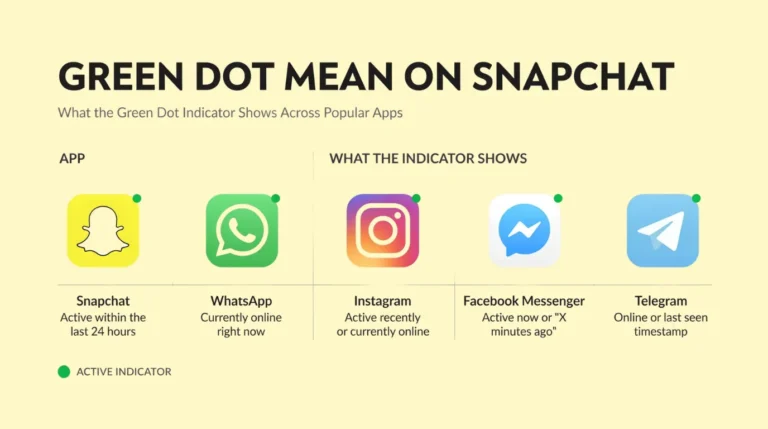
Snapchat’s version is the least precise. It gives the broadest window (24 hours) and does not show exactly when someone was last on. This actually protects privacy a bit more than apps that say “Active 3 minutes ago” or “Online now.”
How to Turn Off the Green Dot on Snapchat?
If you don’t want people to see you’ve been active on Snapchat, you can turn off the green dot. Luckily, doing this is quick and easy.
- First, open Snapchat and tap your Bitmoji or profile picture at the top left of the screen.
- Next, tap the gear icon at the top right and tap your settings.
- Then, scroll to the privacy controls and tap the activity indicator.
- Finally, toggle the switch to the off position.
That’s all you have to do! After doing this, no one will see a green dot next to your name or Bitmoji, even when you’re using the app.
Note: When you disable your Activity Indicator, you will no longer see the green dots for other users. Snapchat makes this a two-way thing – when you hide your status, you can no longer see others’ status.
What Happens When You Turn Off the Green Dot?
When you disable the Activity Indicator:
- Your green dot disappears for everyone else
- You can no longer see anyone else’s green dot either
- Your typing indicators still work (people can still see when you are typing)
- Read receipts still work (people can still see when you open a snap or message)
- Your Snap Score is still visible to friends
- Your Snap Map location is not affected (that is a separate setting)
Turning off the green dot only hides your activity status. Everything else in the app keeps working as normal.
How to Know If Someone Is Active on Snapchat Without the Green Dot?
If someone has their Activity Indicator disabled, or if you want a more precise idea of whether they are currently online, here are a couple of other options you can try.
- Check Snap Map: Open the map by tapping the location icon at the bottom of your screen. If a friend has Snap Map enabled and is not on Ghost Mode, you can tap their Bitmoji and see when they were last active. If it says ‘Just now,’ they are more than likely on the app.
- Check their Snap Score: If someone’s Snap Score goes up between the time you check it, that means they have been sending or receiving snaps, which means they were active.
- Watch your story views: If someone views your story shortly after you post it, they were clearly on the app.
- Look at message status: If a snap or chat you sent changes from “Delivered” to “Opened,” the person just opened the app and saw your message.
None of these is perfect, but together they give you a clearer picture than the green dot alone.
What Does “Snapchat Last Active Just Now” Mean?
Sometimes, next to the green dot, you will see text that says something like “Just now,” or “5 minutes,” or “2 hours.” This is a time stamp showing roughly how recently someone was active on Snapchat.
If it’s “Just now,” they were on the app very recently, likely in the last minute or two. This is one of the closest estimates to real time you can get on Snapchat with the green dot.
Keep in mind that “Just now” can be a slight delay or be cached, so it’s not completely accurate. But it is a good general signal for them being on the app.
Is Snapchat’s Last Active Time Ever Wrong?
Yes, it can be. A few things can cause the last active time shown next to the green dot to be slightly off:
- App running in the background. If Snapchat refreshes automatically on someone’s phone, it can log activity even when the person is not actually looking at the app.
- Slow updates. The timestamp does not always update in real time. There can be a small delay.
- Server-side caching. Snapchat’s servers sometimes hold onto old data for a short period before refreshing.
This is why the green dot and its timestamps are best treated as rough guides rather than exact facts.
Is the Green Dot Only for Snapchat+ Users?
No. The Activity Indicator (green dot) is available to all Snapchat users for free. You do not need a Snapchat+ subscription to see it or have it appear on your profile.
In contrast, the Friend Solar System (planets) is only available to Snapchat+ subscribers. The green dot is available in the base version of the app.
What Does the Green Dot Mean on Snapchat on iPhone?
The green dot for iPhone functions the same as it does for Android. The green dot is the Activity Indicator and indicates that the user was active recently on Snapchat.
There’s a different green dot that appears on your iPhone that isn’t related to activity on Snapchat. In iOS 14 and above, if an app is accessing your camera, a small green dot will show in the top right of your screen. Because Snapchat opens to the camera, a green dot will appear at the top of your screen. This is part of Apple’s privacy protection, and isn’t related to Snapchat in any way. It simply means the camera is on.
These two green dots are completely separate things:
- Green dot on a friend’s profile inside Snapchat = Activity Indicator (they were recently active)
- Green dot at the top of your iPhone screen = Apple’s camera privacy indicator (the camera is in use)
Frequently Asked Questions
Final Thoughts
The green dot on Snapchat indicates that someone has been active on the app in the last 24 hours. That is the whole story. It is not a live tracker, it does not reveal what someone is doing, and it does not tell you if they have read your message.
To turn off the Activity Indicator, go to your settings and Disable Activity Status. This is one of the quickest app settings changes you can make. When you disable the activity status, you will not see the green dots for your friends.
Now that you know what it means, you can stop second-guessing it every time you spot that little dot on someone’s profile.

I’m Vanessa Harrison, a Snapchat and social media specialist, as well as a content writer passionate about helping people make the most of their online presence. I create engaging, easy-to-follow content focused on Snapchat and social media trends, tips, and strategies. At Planet Snapchat, I combine my experience in social media with clear, informative writing to help readers stay updated and get the most out of their digital interactions.