
Snapchat Streaks Explained: Symbols, Rules, and How to Restore a Lost Streak
Updated July 2026
Snapchat streaks are one of the app’s most popular features. Millions of users keep their streaks going every day, but many still have questions about how they work. What counts as a Snap? What do the streak emojis mean? And what should you do if your streak suddenly disappears?
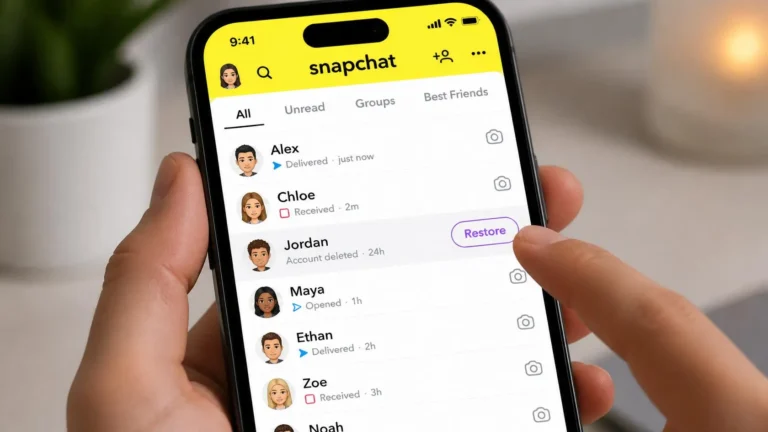
You’ll learn how Snapchat streaks work and how Instant Streaks work. How do streaks affect your Snap Score, and how do you restore a lost streak?
What Is a Snapchat Streak?
A Snapchat streak counts how many days in a row two people have sent each other a photo or video snap. A regular chat message doesn’t count; it has to be an actual snap. Once you and a friend have done this for three days straight, a fire emoji shows up next to their name, along with a number for the day count.
Streaks don’t give you money or extra features. People like them simply because they show you’re staying in touch with someone every single day. That’s also why losing one can feel more annoying than it probably should
How Do I Start a Snapchat Streak?
Send a friend a photo or video snap, and have them send one back on the same day. Keep this up for three days in a row, and the streak begins on day three, when the fire emoji shows up next to their name.
- It must be a snap (photo or video); a text chat doesn’t count.
- Both people need to send at least one snap within the same 24-hour window.
- Group chats can build a shared group streak, too, as long as most members keep snapping.
How Do I Keep a Snapstreak Going?
Just send a new snap to that friend at least once every 24 hours. Note that the clock doesn’t reset at midnight; it runs 24 hours from your last snap. So if you snapped at 9 p.m. yesterday, send the next one before 9 p.m. today.
Snapchat Streak Symbols: What Each One Means
The emojis next to a friend’s name aren’t random. Each one tells you something different about your streak.
Symbol | What It Means |
|---|---|
🔥 (Fire) | You and your friend have snapped each other for three days in a row or more. Your streak is live. |
Number next to 🔥 | How many days has the streak lasted? “🔥 64” means 64 days in a row. |
⏳ (Hourglass) | Time is running out. Send a snap soon, or the streak will end. |
💯 | Your streak just hit 100 days. |
Special friend emoji | Snapchat gives some close friends their own emoji based on how often you snap. This is separate from the streak count. |
Snapchat Streak Notification: The Hourglass Warning
Treat the hourglass as a real warning, not a small reminder. It shows up when you have only a few hours left before the streak ends. Sending any snap, even a plain photo, resets the clock and saves the streak.
What Are Instant Streaks?
An Instant Streak skips the usual three-day wait. Snapchat can start a streak with certain friends right away, based on how much you already snap them.
Who Can Get an Instant Streak?
This usually happens with friends you already snap a lot with, or with people marked as close or best friends, not with brand-new contacts. Snapchat’s system decides this on its own; you can’t request it directly.
How Do I Turn Instant Streaks On or Off?
Go to your profile, open Settings, and look for a Streaks or Instant Streaks option under friend or notification settings. If you don’t see it yet, it likely hasn’t rolled out to your account. Snapchat tends to release features gradually.
How to See Your Snap Streaks?
Swipe right from the camera screen to open your Chat tab. Every friend you have a live streak with shows the fire emoji and day count right next to their name, so you can check them all at a glance.
How to Increase Your Snap Score Super Fast?
Your Snap Score is different from your streak count, but the two are connected; active streaks push your score up naturally. To grow it faster:
- Send snaps often, since snaps add more points than chat messages.
- Post to your Story regularly, since posts and views add points too.
- Open the snaps people send you, since receiving them counts as well.
- Keep more than one streak going at a time, instead of focusing on just one friend.
There’s no secret trick or shortcut here; your score simply grows the more you use the app normally.
How to Create a Snap?
Open the app; it opens straight to the camera screen. Tap the button once for a photo, or hold it down to record a video. Then tap the arrow to send it to a friend or add it to your Story.
I Lost My Streak. How Do I Restore It?
This is the question people search for the most, and it makes sense: restoring a lost streak only works for a short window of time.
Why Do Snapchat Streaks Break?
- You or your friend forgot to send a snap within 24 hours.
- A snap didn’t go through because of a weak connection, and neither of you noticed.
- Travelling across time zones shifted when the 24-hour window actually falls.
- A short Snapchat outage stopped snaps from sending.
How Do I Restore a Lost Snapchat Streak?
Open the Chat screen and check for a Restore button next to the friend whose streak just ended. If you see it, tap it and follow the steps. This option is only available for a short time right after a streak ends, usually within about 24 hours.
If there’s no Restore button, go to Snapchat Support, search “I lost my Streak,” and fill out the request form explaining what happened. Streaks that just ended have the best chance of being restored; ones lost a while ago usually can’t be brought back.
Why Didn’t the Snapstreak Restore Work?
Your Snapstreak may not have been restored because the restore time limit expired or Snapchat couldn’t verify your request. If the Restore button has disappeared, you can still contact Snapchat Support to request a manual review.
Don’t use third-party apps or websites that promise to restore Snapstreaks. They can’t restore your streak and may put your Snapchat account at risk.
How Many Free Streak Restores Do You Get?
Snapchat usually allows a small number of free restores each month and may offer extra paid restores depending on your account, region, and whether you have Snapchat+. These limits can change, so check the Restore option in your own app for the most accurate number.
How To Restore Lost Snapchat Streaks?
Losing a streak you’ve had going for months is genuinely frustrating, especially when it broke because of a technical glitch and not because either of you forgot. The good news is Snapchat does have a path for getting streaks back in certain situations.
Go to Snapchat’s support page and navigate to the Contact Us section. From there, look for the option related to Snapstreaks and fill out the form explaining what happened. Be specific. Mention the friend’s username, how long the streak was, and what you think caused the issue. Snapchat’s team can actually see your Snap activity logs, so they’ll have context on whether there was a delivery failure or technical problem on their end.
Snapchat streak support restoration is not guaranteed, and it’s important to go in with that expectation. They tend to approve restores when there’s clear evidence of a technical issue, like a Snap that shows as sent on your end but never delivered, or a server-side problem during a widespread app outage. If the streak simply broke because life got in the way, the chances of recovery are low.
That said, it’s always worth submitting the request. Many users have successfully restored streaks of 200 days or longer through the official Snapchat support process. The response usually comes within 24 to 48 hours.
Longest Snapchat Streak Ever Recorded
The all-time longest Snapchat streak also belongs to Katie and Erin, who reached 4,203+ days as of July, 2026. Right behind them are:
- Markus and Dominik – 4,046+ days
- Vadim & David – 4,005+ days
- Louis & Nicolas – 4,001+ days
- Carol & Lisa – 4,001+ days
Maintaining a streak this long takes serious dedication, both friends have to send at least one snap every 24 hours without missing a day.
Frequently Asked Questions
Final Thoughts
A streak is a small feature, but losing one can feel like a big deal; that’s exactly why Snapchat added a restore option in the first place. Watch for the hourglass warning, snap your streaks regularly, and if a streak does break, act fast. The restore window closes quickly, and it’s the only safe, official way to get your streak back.

I’m Vanessa Harrison, a Snapchat and social media specialist, as well as a content writer passionate about helping people make the most of their online presence. I create engaging, easy-to-follow content focused on Snapchat and social media trends, tips, and strategies. At Planet Snapchat, I combine my experience in social media with clear, informative writing to help readers stay updated and get the most out of their digital interactions.